
Custom DB: Your Hands, Your Edge, Your Analysis

📌 TL;DR
Custom DB lets you upload your own hand history archive directly into Maxploit. Drop in a ZIP, the platform parses and processes everything, and your private database appears alongside the public pools. Combine it with Hero Mode to isolate your own hands from the field and hunt your leaks across three perspectives. Zero setup. Zero extra tools.
🩸 The Problem: Your Data Lives in a Silo
You have thousands — maybe millions — of hand histories sitting on your hard drive. You can run them through a traditional tracker, sure. But you're stuck in a bubble:
- No pool comparison. Your tracker shows your stats, but never how you deviate from the population in a specific micro-context.
- No structural analysis. You see VPIP/PFR/3B%, but you can't drill into "How does my OOP check-raise frequency on monotone flops compare to the pool when facing a 75% c-bet in 3BP?"
- No exploitation engine. Your data just sits there. It doesn't interact with GTO baselines, EV Attribution waterfalls, or Range X-Ray decompositions.
Maxploit changes this. Your hand histories become a first-class private database using the same report pipeline as the public pools, but containing your data.
⚡ How It Works
1. Upload
Navigate to the Hand History Hub and hit Create New Database. Drag and drop your ZIP file — that's it.
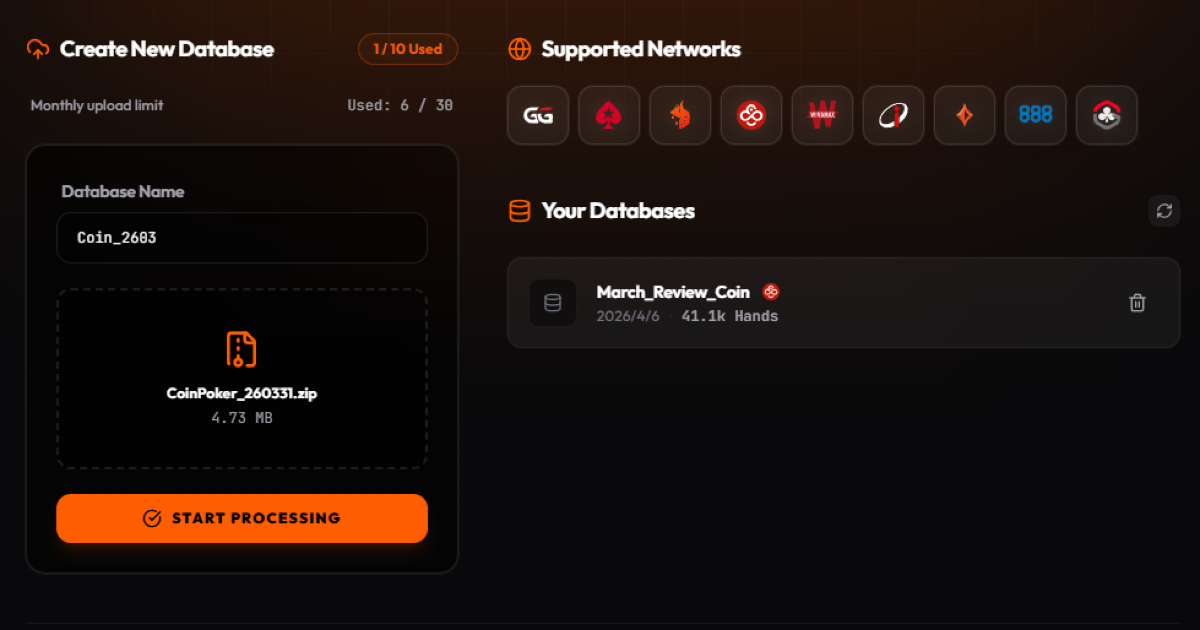 The Hand History Hub: drag, drop, done.
Maxploit's backend fires up a high-performance parser that automatically detects supported poker sites, extracts durable features — bet sizes, board textures, position types, nuts detection, EV attribution — and writes an optimized database for fast analytical queries.
Upload a real ZIP archive containing text hand histories. The UI shows the exact limits for your plan before processing starts. Regular accepts ZIP files up to 128 MB, and processes at most 200K hands per database.
2. Process
Maxploit runs your data through multiple analysis layers in the background — building optimized indexes, pre-computing aggregates, and preparing report data. A typical 500K-hand database is fully processed in 1–3 minutes. Your data is encrypted, isolated, and never shared with other users.
3. Analyze
Your database appears in the database selector as a private pool source. It uses the same report components as the global pools, subject to your plan:
- Strategy Matrix — Full action frequency matrix with EV Heatmaps
- EV Attribution — Multi-street profit breakdown
- GTO Deviations — Where your pool diverges from equilibrium
- Range X-Ray — Hand class, draw, and showdown decomposition
- Texture Breakdown — Board texture aggregated analysis at a glance
- Debiased Range — True range reconstruction beyond showdown bias
Every panel, every filter, every drilldown — it all works on your private data, identically to the global databases.
🦸 Hero Mode: Three Perspectives, Zero Extra Queries
This is where Custom DB becomes a genuine weapon.
When your own hands are in the database, Maxploit can separate your actions from the rest of the pool. Activate Hero Mode from the perspective dropdown and instantly switch between three views:
🟠 Hero OOP
Your OOP play vs the pool's IP play. See how your defense frequencies, check-raise tendencies, and donk strategies compare to the field when you're out of position.
🔵 Hero Leaks
Your play on both sides — Hero vs GTO. The theory match. This is the purest leak-hunting view: see your own tendencies isolated from the noise of the field.
🟢 Hero IP
Your IP play vs the pool's OOP play. Isolate your c-bet frequencies, barrel strategies, and how aggressively you exploit position compared to the population.
Switching between all three perspectives is instant — no additional waiting. Just click and compare.
The Leak-Hunting Workflow
- Open your private database in the Strategy Matrix
- Select a spot — say, CO vs BB SRP on the Flop
- Switch to Hero OOP — you're the BB. How does your check-raise frequency compare to the pool?
- Switch to Hero Leaks — your play on both sides. Where do the numbers diverge from GTO?
- Switch to Hero IP — now you're CO. Are you c-betting wider or tighter than the field?
Each switch reveals a different layer of your game. Within minutes, you can identify systematic patterns that would take hours of manual review in a traditional tracker.
🛡️ Your Data, Your Control
| Protection | Detail |
|---|---|
| Complete Isolation | Your database lives in your own private directory — it is never mixed into public pools or visible to other users |
| Login-Protected Access | Every upload, query, and deletion requires authentication. No one can access your data without your account |
| Full Deletion Rights | Delete any database at any time with a two-step confirmation. Both raw uploads and processed data are permanently removed |
| Transparent Quotas | Your current usage and limits are always visible in the UI — no surprises |
| Rate Limiting | Upload frequency is capped per user to keep the platform fast and fair for everyone |
📊 Tier Comparison
| Regular | Grinder | Crusher | |
|---|---|---|---|
| Max ZIP size | 128 MB | 512 MB | 2 GB |
| Max hands / database | 200K | 2M | 20M |
| Max databases | 1 | 3 | 10 |
| Uploads / subscription month | 3 | 10 | 30 |
| Hero Mode | Preflop | ✅ | ✅ |
| Other analysis features | Limited | ✅ | ✅ |
🎯 Who Is This For?
Players who want to find their own leaks. You've been playing 50NL for six months. You have 500K hands. Upload them, activate Hero Mode, and within 10 minutes you'll know exactly where your strategy diverges from the pool — and whether those deviations are profitable or bleeding EV.
Coaches who need deeper analysis. Upload a student's database, open the Strategy Board, and walk through their tendencies node by node. Compare their Hero OOP frequencies against the pool. Show them exactly where they're over-folding or under-bluffing — backed by data, not intuition.
Stables group leaders who want a shared pool. Combine hand histories from multiple players into a single upload. The merged database becomes your group's private population — a controlled dataset for collaborative analysis.
🚀 Getting Started
- Log in to Maxploit
- Click the Database in the sidebar to open the Hand History Hub
- Click My Database → Create New Database → drag in your ZIP
- Wait for processing (typically 1–3 minutes for 500K hands)
- Select your new database from the dropdown → activate Hero Mode
Your hands. Your edge. Your analysis.